When is a trip log required?
To avoid a benefit-in-kind addition for a company car, you must prove that you do not drive more than 500 kilometres for private use on an annual basis. A complete mileage log is one way to do this; other convincing evidence is also acceptable. In the case of a private car, you substantiate the business kilometres in order to claim business expenses.
As an entrepreneur, you cannot apply for a 'No private use of company car' statement; that is for employees. A different arrangement exists for exclusively business use of a van. Read the official rules for mileage registration and exceptions.
Taxable benefit for private use
If you drive more than 500 private kilometres per year in a business car, you must account for the applicable addition. To show that you remain within that threshold, keep careful records. Check that odometer readings follow on from one another and explain any discrepancies. Incomplete records may weaken your evidence, although other convincing evidence may still be accepted.
What do you need to keep in a trip log?
Above the mileage log, state the make, model and registration number of the car and the period during which you used it. Record per journey:
- Date
- Departure and arrival address
- Odometer start and end position
- Whether the trip was business or private
- Splitting of business and private mileage for mixed trips
- Deviations from the normal route, with explanations as to why
- A complete mileage record that reconciles with the odometer readings
A return journey consists of two separate trips. Check that all trips together match the actual odometer readings.
App for trip registration
An app can reduce data entry work. Check for yourself whether all journeys are present, the private or business designation is correct and the odometer readings align. Also pay attention to readable exports and storage options. An app does not in itself guarantee a fiscally watertight administration.
Trip registration example
Fictitious example; the addresses and distance are for illustration purposes only:
| Given | Example |
|---|---|
| Date | 14 September 2026 |
| Starting / ending odometer reading | 12,400 km / 12,418 km |
| Departure address | 1 Example Street, Example City |
| Arrival address | 20 Voorbeeldlaan, Voorbeelddorp |
| Distance and objective | 18 km, business client visit |
| Alternative route / private detour | No |
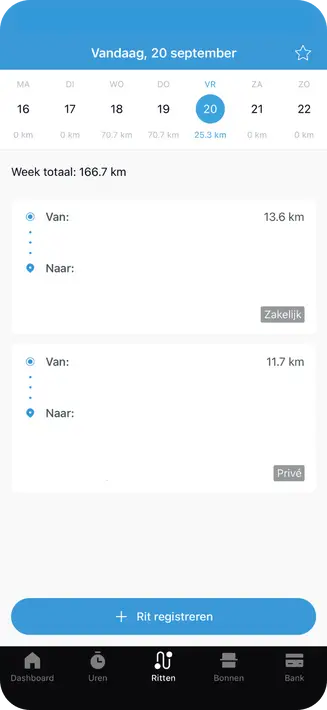
Put the return trip on a separate line. Use real addresses and odometer readings in your own logbook. A calculated route distance alone does not prove a continuous mileage record. The image below shows a possible app display; always check the required data.
Other providers
Compare solutions on the fields they store, correcting missed journeys, distinguishing private journeys and readable exports. Check the current price and how you retain data when you cancel the subscription.
Box for trip registration
A tracking device can record journeys automatically. Keep checking for missing journeys, the private or business classification, odometer readings and export data. Malfunctions or incorrect settings can cause errors. Furthermore, a device does not guarantee conclusive tax evidence.
Form for trip registration
You can also track journeys manually with a form or document. As long as you record all the compulsory details, this complies with the rules. This works well if you make few trips and like to keep an overview yourself. With a paper form or digital document, you have control over your records and can easily keep everything with your accounts.
Track in Excel
In Excel, you can create a clear table for your trips. In it, you record the date, addresses, mileage and whether the trip was business or private. Filling this in after each trip keeps your records up to date and complete. Excel works well if you are looking for a simple and flexible way to keep track of journeys. Keep the file safe and make regular backups so that your data remain secure.
Mileage registration for kilometre reimbursement
For a private car, you substantiate the business kilometres for mileage. For income tax purposes, business home-work travel counts. For VAT, however, home-work travel is private use. Keep this distinction recognisable if you are also assessing VAT on car expenses. Read the separate explanation about VAT on private use of the car.
Common mistakes
Many errors occur because journeys are not fully or clearly recorded.
- Failing to complete journeys resulting in inconclusive records.
- Mark private trips as business or vice versa.
- Failing to record starting and ending odometer readings, leaving gaps between journeys.
- Divergent routes not mentioned when detouring.
- Excel not saving or backing up.